For an app, a useful AGD creative connects a recognisable audience problem to a visible product action. In this StudyFetch post, the creator introduces a specific memorisation task, shows the corresponding prompt on a laptop and exposes the generated answer. The connection is the lesson to study.
StudyFetch: make the study problem the opening
Follow the same question across the creator segment, the filmed laptop and the answer. Each cut needs to keep that connection intact.
- FORMAT
- Specific problem → filmed app → usable answer
- PRODUCT’S ROLE
- StudyFetch is shown answering the task introduced by the creator.
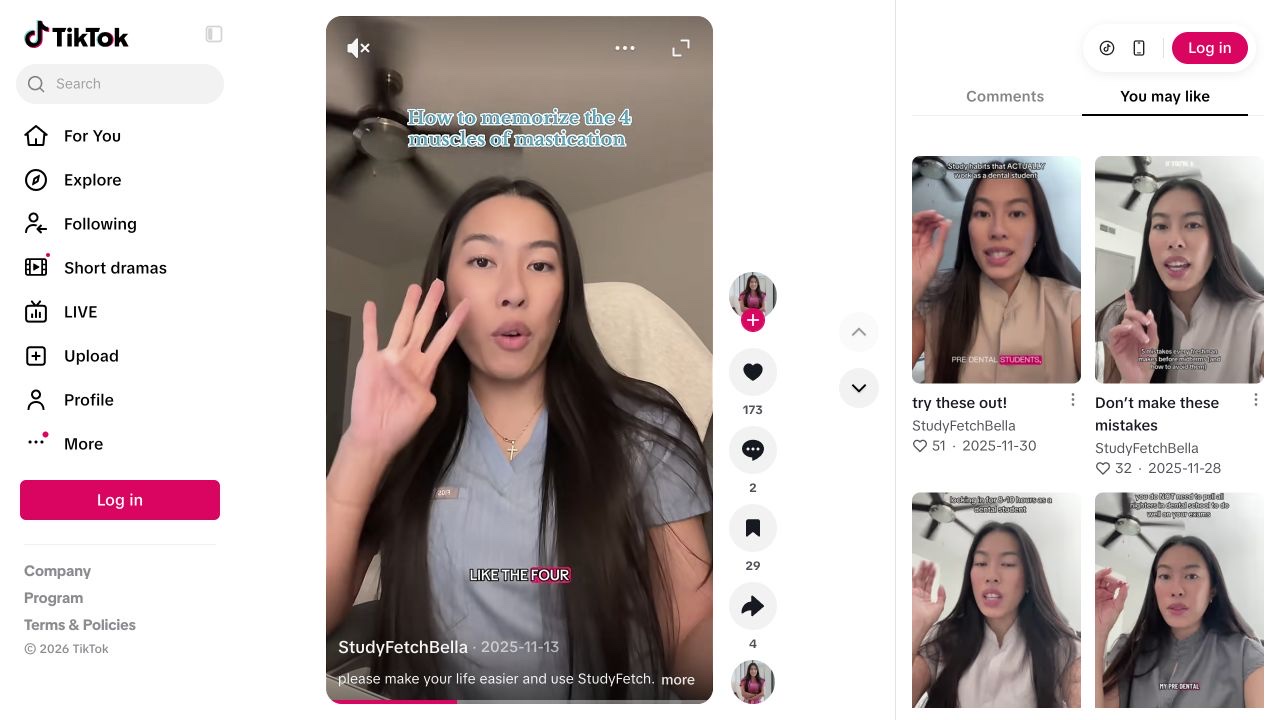
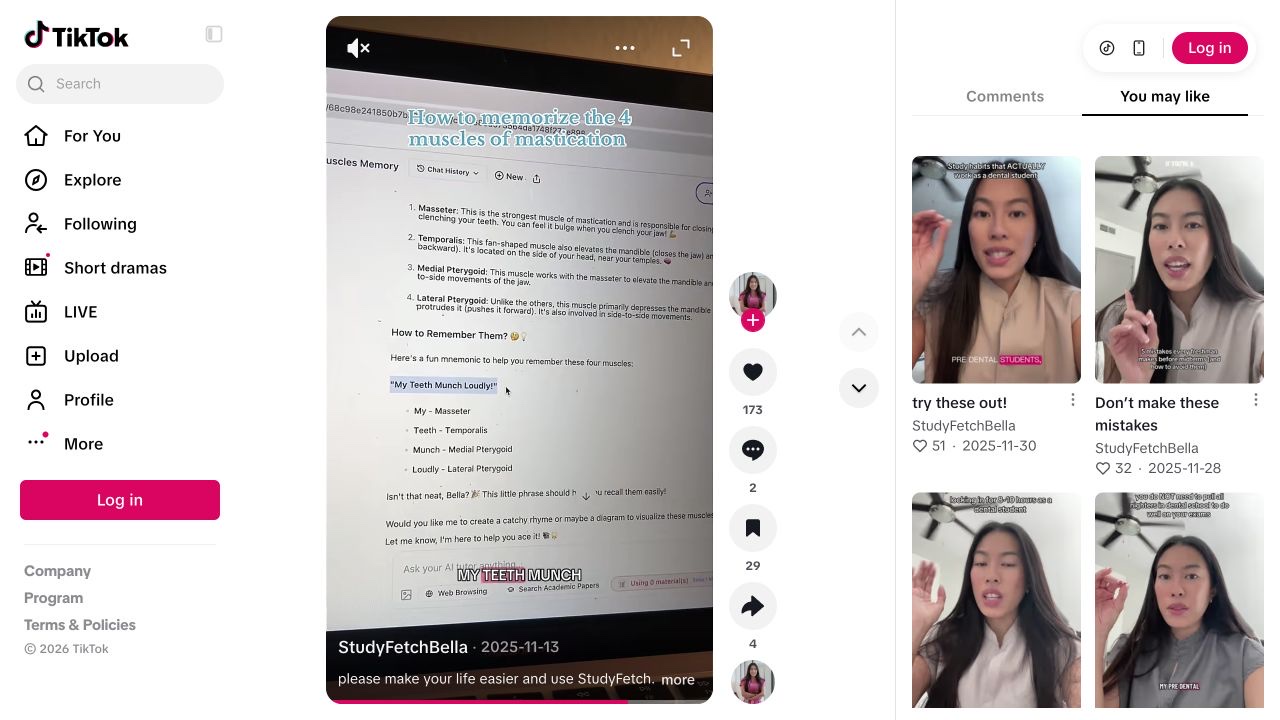
A student trying to remember a defined set of terms.
- 01
Name the job before the app
The creator speaks to camera about memorising four terms and counts them on her fingers.
Our read. The opening lets a relevant viewer recognise their own problem. It gives the later app appearance a reason to be in the video, beyond a generic claim that AI saves time.
- 02
Show the request
The view changes to a filmed laptop with StudyFetch’s chat and a prompt about the same memorisation task.
Our read. The continuity matters: the product addresses the exact problem introduced earlier. A cut to an unrelated dashboard would supply branding while withholding the useful connection.
- 03
Expose the output
The answer contains a mnemonic with words mapped to the terms; the clip then returns to the creator.
Our read. The viewer can inspect what the tool produced. The output’s presence is observable; its accuracy and usefulness still require subject-matter checking. That distinction should survive any adaptation.
One audience problem. One visible product action.
Original brief for a study app demonstration. A proposal to test.
“I keep mixing up these four terms, so I tried this.”
- Show on screen
- Use a study question you can verify. Show the problem, enter the request in the actual app and display the answer long enough to read. Correct any mistake on screen instead of hiding it in the edit.
- Keep the mechanism
- The same problem across the opening, prompt and answer.
- Make it yours
- Use your own subject, recording and explanation. Do not impersonate this creator or imply their endorsement.
- What to record
- Record the source clip, concept, account, post URL and publication date. Read product questions separately from generic reactions; use your own click and signup evidence for conversion claims.
Source & observation notes
The creator introduces a concrete memorisation task, then films the StudyFetch chat on a laptop. A prompt and its generated mnemonic are visible before the clip returns to the creator.
A narrow audience problem leads directly to the product operation that addresses it. The filmed screen gives the recommendation an inspectable object.
The creator’s commercial relationship with StudyFetch was not verified. This visual inspection does not validate the educational answer or establish organic reach, paid amplification or conversions.
Playback started and visual sequence inspected on 9 September 2026. Muted observation; no audio transcription or product test. Source checked 2026-09-09. Source 1 ↗ Source 2 ↗
01STORY BRIEFThe idea in three screens.3 SCREENS
Give the app a job in the story.
A creator’s StudyFetch video moves from one awkward study problem to the actual app. Here is the structure an AGD team can use in its own product demos.
A stranger scrolling past your app does not owe it a feature tour. Give them a problem worth staying for. The StudyFetch clip above does that with a narrow study task, then keeps the same task in view when the product appears. The app earns its place in the scene. You can examine that continuity without pretending to know what the post generated in installs or revenue.
This is a more useful reference for an app founder than an instruction to “be authentic”. The creator, question and product action fit together on screen. A different account could address a different kind of student or a different moment in their work, but the same edit cannot prove that a whole account network would perform. The unit we can inspect here is one published creative.
Keep the same question from hook to answer.
The first editorial decision is the audience’s job. In this case it is a specific memorisation problem, not “students who like technology”. That level of detail is what makes an account brief useful. A student preparing a presentation, someone revising a terminology list and someone organising lecture notes might all use the same product, but they would need different demonstrations. Write the task, the moment and the expected output before you write an opening line. Then check whether the actual product can deliver the output you are planning to show. If it cannot, change the concept instead of asking the edit to conceal the gap.
A product demo with an unbroken question
- 01Audience task
Name the job in the viewer’s own context.
- 02Visible input
Show what you give the actual product.
- 03Inspectable output
Let the viewer understand what came back.
- 04Next action
Connect interest to a relevant destination.
Editorial model: a way to reason about the process, not measured platform results.
The camera’s move to the laptop is the hinge of the creative. It connects the recommendation to something a viewer can inspect: a question and its answer. The oblique screen recording is not pristine studio footage, and that should not become a new rule that roughness performs better. What matters for this reading is that the operation stays connected to the opening. In your own version, favour legibility. Crop out irrelevant browser chrome, make the input readable and leave enough time for a viewer to understand the output. A fast cut can create pace while still leaving the useful part impossible to examine.
For an AGD team, account differentiation should start before the recording. Give each account a reason to ask a different question of the product. One could centre on planning a revision session, another on checking understanding after a lecture, and another on making a group presentation. These are proposed editorial directions, not accounts we observed in the StudyFetch campaign. Each needs its own visible task and an honest voice. Repeating one script through several profiles gives you more publication instances; it does not automatically give you more audience insight.
Keep a creative record that survives the upload. Save the source of inspiration, your own recording, the concept ID, the changed variable and the final post URL. If a new opening performs differently, you need to know whether the demonstration also changed. Read comments for the job people are asking about, then compare that with the destination you offer. A viewer asking whether the app handles lecture recordings should not land on a page that says nothing about recordings. UTMs can help trace a visit; the purchase still needs its own event record. Treat a public view count as a reason to inspect a creative, not as a substitute for this chain.
At handoff, the operator should receive a finished package: original media with the necessary rights, a caption that matches the demonstrated task, an account identifier and a valid publishing window. TokPortal’s video-slot workflow below makes those inputs explicit. The product helps move an approved idea into an operational queue. The part it cannot decide for you is whether the original promise survives the upload. Watch the final asset once as somebody who has never heard of your app. If the product appears without answering the opening question, return to the brief.
From the idea to the actual workflow.
Product screens, documented tools and a practical way to connect them.
Prepare the actual video slot, not just the caption
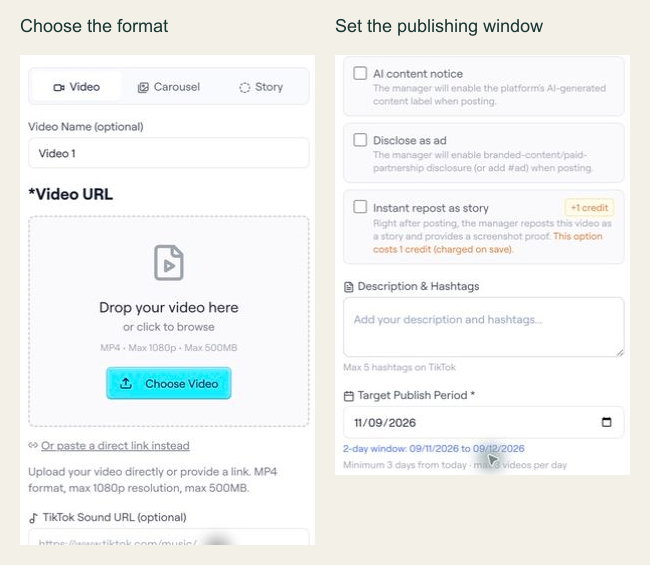
In the archived editor capture, the interface shows Video, Carousel and Story options, plus a target publishing period. The API example below is a separate documented slot-configuration preview; the screenshot alone does not establish the API contract.
PUT /api/ext/bundles/{id}/videos/{position}{
"tool": "tokportal_configure_bundle_video",
"arguments": {
"id": "<real-bundle-uuid>",
"position": 1,
"body": {
"video_type": "video",
"video_url": "<public_url returned by your video upload>",
"description": "A practical example of organising freelance subscriptions.",
"target_publish_date": "<valid future date: YYYY-MM-DD>",
"ai_content_disclaimer": false,
"auto_publish": false
},
"dry_run": true
}
}Replace the marked values with an authorized real bundle, a media URL you control and a valid future date. This is a dry-run template, not an executed campaign. The archived UI shows a two-day period for that captured example; use the current API validation response to determine the dates accepted for your own request.
- 01Choose the correct media fields
A video needs video_url and description. A TikTok carousel instead needs carousel_images and tiktok_sound_url.
- 02Use a valid window
Allow at least three days while account creation is pending, or one day for delivered/existing accounts. Check the current response and limits.
- 03Read the preview result
Check the simulation markers and date validation. If INVALID_DATE includes details.earliest_allowed, use that returned limit to revise the proposed date. Never copy preview IDs into live requests.
“Give the app a job in the story.”
02FIELD KITFrom concept to practice.4 SCREENS
Write the exact audience question before drafting a product claim.
Adapt this to your audience, budget and test scope.
Put it to work.
- 01Write the exact audience question before drafting a product claim.
- 02Record your own prompt, the returned answer and any necessary correction.
- 03Assign a concept ID, account and destination URL to each version.
- 04Check clicks and first purchases separately from views and comments.
Notes & sources.
The limit. The creator’s commercial relationship, acquisition results and the correctness of the generated study answer were not independently verified.
Further reading is linked throughout this article. Worked examples explain a process; they are not campaign results.
THE ORGANIC CLUB is an editorial project initiated by TokPortal. That relationship is separate from the evidence behind claims. Editorial signatures and image credits are explained in our policy. Our editorial policy →