
Content Isolation preserves meaningful creative differences between accounts: narrative, angle, format or purpose. It complements Account Isolation, which differentiates distribution surfaces.
One LEGO set, several fashion interpretations
Identify the underlying idea before listing surface details in the example. Then sketch a variation that would genuinely teach something different. Do not mistake a different crop or soundtrack for a new audience hypothesis.
- FORMAT
- Object → visual reinterpretation
- PRODUCT’S ROLE
- LEGO objects provide the visual source material for the fashion idea.
A viewer who enjoys recognising an object in a surprising new form.
- 01
Make the reference recognisable
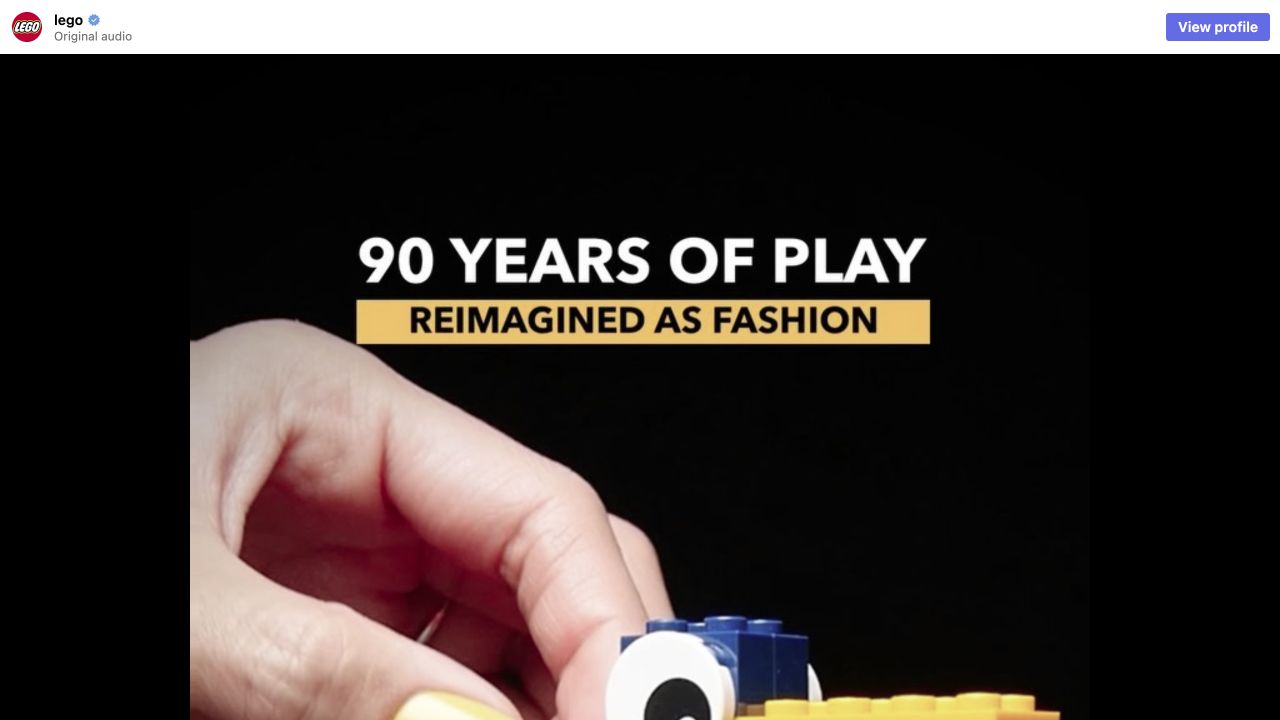
The Reel shows a small LEGO duck with a long yellow beak and coloured body.
Our read. A transformation only rewards recognition when the original is clear. If the viewer cannot identify the source, the reveal loses the comparison that makes it satisfying.
- 02
Carry a few cues across
The inspected Reel moves between LEGO objects and fashion imagery.
Our read. The useful exercise is choosing which colours, shapes or proportions survive the change of medium. Randomly changing the backdrop would not create the same relationship.
- 03
Make the difference visible
The saved fashion frame makes the reinterpretation available for comparison with the toy.
Our read. A second version can earn attention by explaining a new aspect of the same source. That is a more useful creative distinction than counting exports from one template.
One product, three different proof devices.
Original concepts for a voice-notes app. A proposal to test.
“The same messy idea, rescued three ways.”
- Show on screen
- Use one recording you own. Make a tutorial that shows the operation, a before-and-after that shows the cleaned note, and a short scene that shows somebody using the note later. Label these as separate concepts in the creative sheet.
- Keep the mechanism
- A shared source and a difference the viewer can actually recognise.
- Make it yours
- What the viewer learns from each version. A new font, actor or colour alone is not a new use case.
- What to record
- Give concepts and versions different IDs. Review audience questions and downstream actions by concept before choosing a cosmetic winner.
Source & observation notes
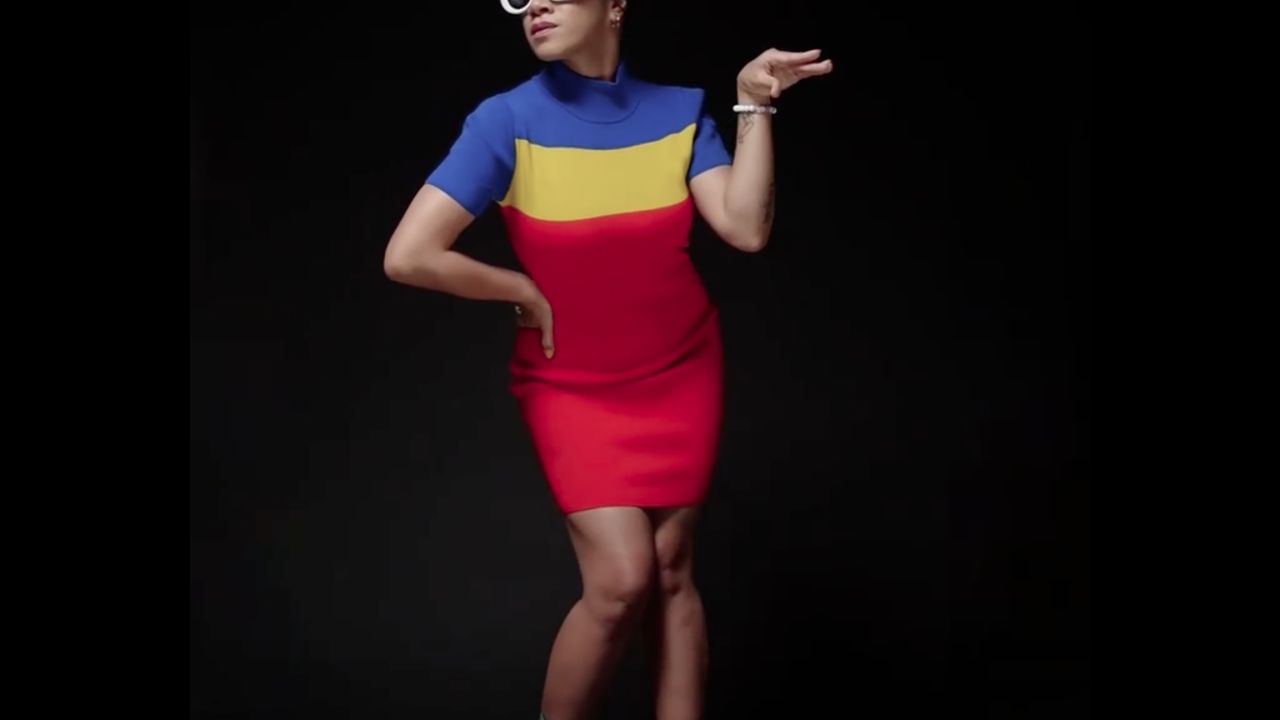
A wheeled multicolor LEGO duck is followed by a model in a blue/yellow/red block-color dress and white glasses. Later observed a red dress with an orange belt and a green top with black skirt and jacket.
The first visible transition translates the toy’s recognizable colors into clothing, giving a clear visual connection between source object and reinterpretation.
Verifies a Reel on LEGO’s official account and the reported fashion premise. It does not verify sales, audience overlap, organic-only distribution or a causal benefit from format diversification.
Playback started and changing visual sequences inspected on 9 September 2026. Audio and every frame were not independently reviewed. Source checked 2026-09-09. Source 1 ↗
01STORY BRIEFThe idea in three screens.3 SCREENS
New subtitles do not make a new idea.
Content Isolation preserves meaningful creative differences between accounts: narrative, angle, format or purpose.
One problem can become a precise demo, a failure story or a comparison of habits. Those versions offer different information. Recoloring an edit preserves its structure and perspective. Archive concepts with their variations so you know whether you are testing an idea or its packaging.
Take an exam-preparation video. One version explains scheduling, another tells a story about forgetting, and a third compares revision methods. They share raw material but change the question addressed. Record that question in the brief. It becomes a practical reason to reject a supposedly new version that merely changes its colors while preserving the same argument and viewing experience.
Variants should change what the audience learns.
Take a product that turns recordings into notes. One concept could show the anxiety of missing a detail in a meeting. Another could show a student reorganising a difficult lecture. A third could compare a chaotic transcript with a useful summary. These are related to one product, but their conflicts and payoffs differ. Replacing a background colour, narrator or opening adjective inside the same scene does not create the same kind of learning. It tests the presentation of an idea, which is useful only if the team labels it honestly.
Concept, version, execution
- 01Concept
The audience problem and the promised resolution.
- 02Version
A deliberate change in angle, evidence or structure.
- 03Execution
The particular asset, caption and publication instance.
Editorial model: a way to reason about the process, not measured platform results.
Give the underlying concept an identifier before producing its variants. Record the intended audience, claim and proof device, then record what each version changes. This makes a later review possible: did the meeting situation work, or did one particular first frame help? Avoid forcing a single winner across audiences that need different things. Keep a promising concept’s failures too. A folder containing only the best-looking exports cannot explain why the next batch should be different, and a generation pipeline cannot recover distinctions nobody bothered to write down.
The Stevie Nicks response is a useful counterexample to the idea that differentiation requires abandoning every recognisable cue. A cultural reference can remain visible while the contributor changes the action, setting or point of view. In an account network, write down what each version adds before producing it. One account might explain a workflow, another challenge its cost assumptions and another show a particular use case. If the only difference is the voice reading the same script, the audience has gained little. Preserve source credit and rights, and distinguish making an original response from downloading someone else's footage and redistributing it.
The LEGO example below gives this distinction something concrete to bite on. The reference frame shows a LEGO duck; the Reel turns that toy into a fashion reveal. Those are not just two colour treatments of the same export. One gives the viewer an object, the other asks them to recognise that object through a new medium. The lesson for a product team is to change the proof device. A tutorial can demonstrate a feature; a before-and-after can expose a problem; a short scene can make the consequence recognisable. They can share a product and still earn different reasons to watch.
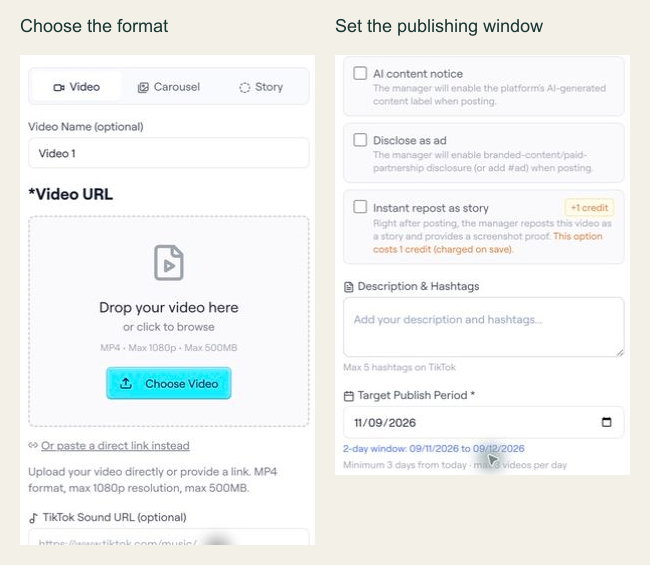
Carry that distinction into the publishing record. Give each original concept a short name in your working sheet, then attach the actual video file to its own slot in the editor shown below. Check the destination account, media type and caption together. If the caption promises a demonstration but the upload is an unrelated mood clip, the package is incoherent even if every required API field is present. A successful readiness check confirms operational inputs; the editorial check still belongs to the person who can compare the promise with the visible payoff.
From the idea to the actual workflow.
Product screens, documented tools and a practical way to connect them.
Prepare the actual video slot, not just the caption
In the archived editor capture, the interface shows Video, Carousel and Story options, plus a target publishing period. The API example below is a separate documented slot-configuration preview; the screenshot alone does not establish the API contract.
PUT /api/ext/bundles/{id}/videos/{position}{
"tool": "tokportal_configure_bundle_video",
"arguments": {
"id": "<real-bundle-uuid>",
"position": 1,
"body": {
"video_type": "video",
"video_url": "<public_url returned by your video upload>",
"description": "A practical example of organising freelance subscriptions.",
"target_publish_date": "<valid future date: YYYY-MM-DD>",
"ai_content_disclaimer": false,
"auto_publish": false
},
"dry_run": true
}
}Replace the marked values with an authorized real bundle, a media URL you control and a valid future date. This is a dry-run template, not an executed campaign. The archived UI shows a two-day period for that captured example; use the current API validation response to determine the dates accepted for your own request.
- 01Choose the correct media fields
A video needs video_url and description. A TikTok carousel instead needs carousel_images and tiktok_sound_url.
- 02Use a valid window
Allow at least three days while account creation is pending, or one day for delivered/existing accounts. Check the current response and limits.
- 03Read the preview result
Check the simulation markers and date validation. If INVALID_DATE includes details.earliest_allowed, use that returned limit to revise the proposed date. Never copy preview IDs into live requests.
“New subtitles do not make a new idea.”
02FIELD KITFrom concept to practice.2 SCREENS
Assign an identifier to each creative concept.
Adapt this to your audience, budget and test scope.
Put it to work.
- 01Assign an identifier to each creative concept.
- 02Record what each version changes for the viewer.
Notes & sources.
The limit. Duplication can make one looping idea look like many experiments.
Further reading is linked throughout this article. Worked examples explain a process; they are not campaign results.
THE ORGANIC CLUB is an editorial project initiated by TokPortal. That relationship is separate from the evidence behind claims. Editorial signatures and image credits are explained in our policy. Our editorial policy →




.jpg)