
A publishing window defines an acceptable interval for a task. It supports planning without claiming a particular minute guarantees better reach.
01STORY BRIEFThe idea in three screens.3 SCREENS

A publishing window beats a sacred minute.
A publishing window defines an acceptable interval for a task.
Use the market’s timezone and retain an absolute timestamp for analysis. If content depends on an event, record the actual deadline. A post delivered on time in the wrong timezone is not a correct delivery. Operational precision matters even when timing’s marketing effect is uncertain.
For event-dependent content, add a post-deadline rule: pause and request a new brief rather than publish something now inaccurate. Evergreen material may allow a wider window. The calendar becomes a contract suited to the editorial substance rather than a collection of precise times chosen by habit. This also helps operators prioritize work according to real consequences instead of the visual density of a scheduling board.
Use a window that matches the work and the question.
A publishing window is an operational commitment, not a prediction that one exact minute contains special reach. It should reflect when the intended audience situation makes sense and when the team can reliably execute and inspect the post. A live event may require a narrow window; an evergreen explanation may not. Write which kind of timing matters before attaching a timestamp to the brief.
Timing as an operating variable
- 01Intent
Why this window is relevant to the audience or event.
- 02Execution
When the action actually occurred and any deviation.
- 03Observation
The comparable age at which outcomes are reviewed.
Editorial model: a way to reason about the process, not measured platform results.
If timing is the variable being tested, compare defined windows with similar creative material and account contexts. Keep post age comparable when reading the results. A morning post with two days of observation and an evening post with two hours have not had the same opportunity to accumulate outcomes. Record missed windows and other deviations rather than quietly excluding them. The useful result is a decision about your publishing workflow under stated conditions, not a universal timetable to copy into every account’s calendar.
From the idea to the actual workflow.
Product screens, documented tools and a practical way to connect them.
Prepare the actual video slot, not just the caption
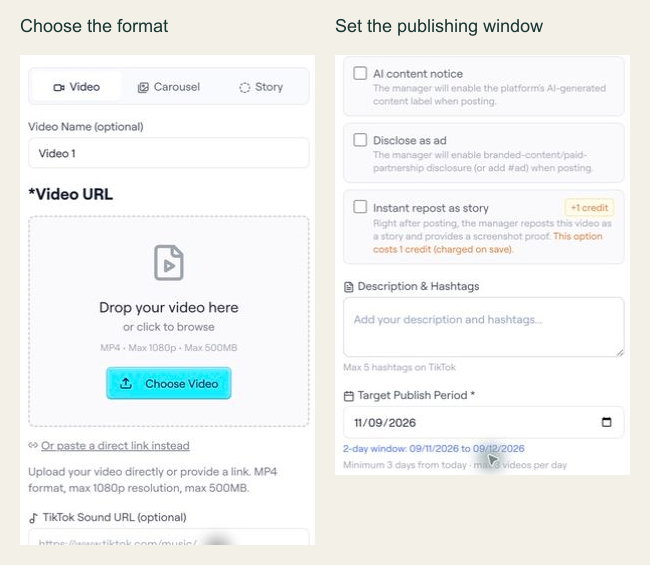
In the archived editor capture, the interface shows Video, Carousel and Story options, plus a target publishing period. The API example below is a separate documented slot-configuration preview; the screenshot alone does not establish the API contract.
PUT /api/ext/bundles/{id}/videos/{position}{
"tool": "tokportal_configure_bundle_video",
"arguments": {
"id": "<real-bundle-uuid>",
"position": 1,
"body": {
"video_type": "video",
"video_url": "<public_url returned by your video upload>",
"description": "A practical example of organising freelance subscriptions.",
"target_publish_date": "<valid future date: YYYY-MM-DD>",
"ai_content_disclaimer": false,
"auto_publish": false
},
"dry_run": true
}
}Replace the marked values with an authorized real bundle, a media URL you control and a valid future date. This is a dry-run template, not an executed campaign. The archived UI shows a two-day period for that captured example; use the current API validation response to determine the dates accepted for your own request.
- 01Choose the correct media fields
A video needs video_url and description. A TikTok carousel instead needs carousel_images and tiktok_sound_url.
- 02Use a valid window
Allow at least three days while account creation is pending, or one day for delivered/existing accounts. Check the current response and limits.
- 03Read the preview result
Check the simulation markers and date validation. If INVALID_DATE includes details.earliest_allowed, use that returned limit to revise the proposed date. Never copy preview IDs into live requests.
“A publishing window beats a sacred minute.”
02FIELD KITFrom concept to practice.2 SCREENS
Name the timezone and interval.
Adapt this to your audience, budget and test scope.
Put it to work.
- 01Name the timezone and interval.
- 02Record actual publication time.
Notes & sources.
The limit. Punctuality does not prove a universal optimal posting time.
Further reading is linked throughout this article. Worked examples explain a process; they are not campaign results.
THE ORGANIC CLUB is an editorial project initiated by TokPortal. That relationship is separate from the evidence behind claims. Editorial signatures and image credits are explained in our policy. Our editorial policy →



.jpg)