For a tightly defined app use case, compare problem-first and screen-first openings while keeping the feature, claim, and edit as similar as possible, then evaluate whether viewers understood the intended job using comments and documented post analytics.
StudyFetch: make the study problem the opening
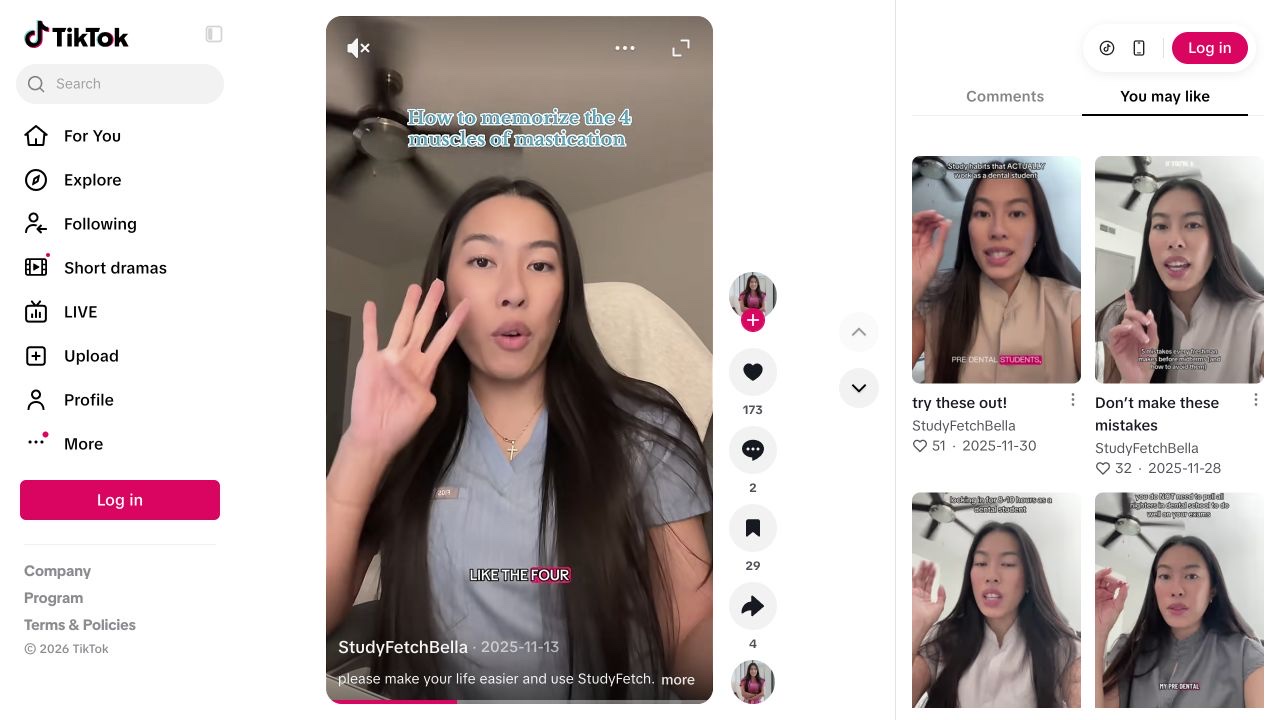
The StudyFetch archival case is relevant because the memorization problem is legible before the filmed product action, which is the exact sequencing choice examined here. We use it as a visual reference for creative structure, not as evidence that one opening order universally outperforms another.
- FORMAT
- Specific problem → filmed app → usable answer
- PRODUCT’S ROLE
- StudyFetch is shown answering the task introduced by the creator.
A student trying to remember a defined set of terms.
- 01
Name the job before the app
The creator speaks to camera about memorising four terms and counts them on her fingers.
Our read. The opening lets a relevant viewer recognise their own problem. It gives the later app appearance a reason to be in the video, beyond a generic claim that AI saves time.
- 02
Show the request
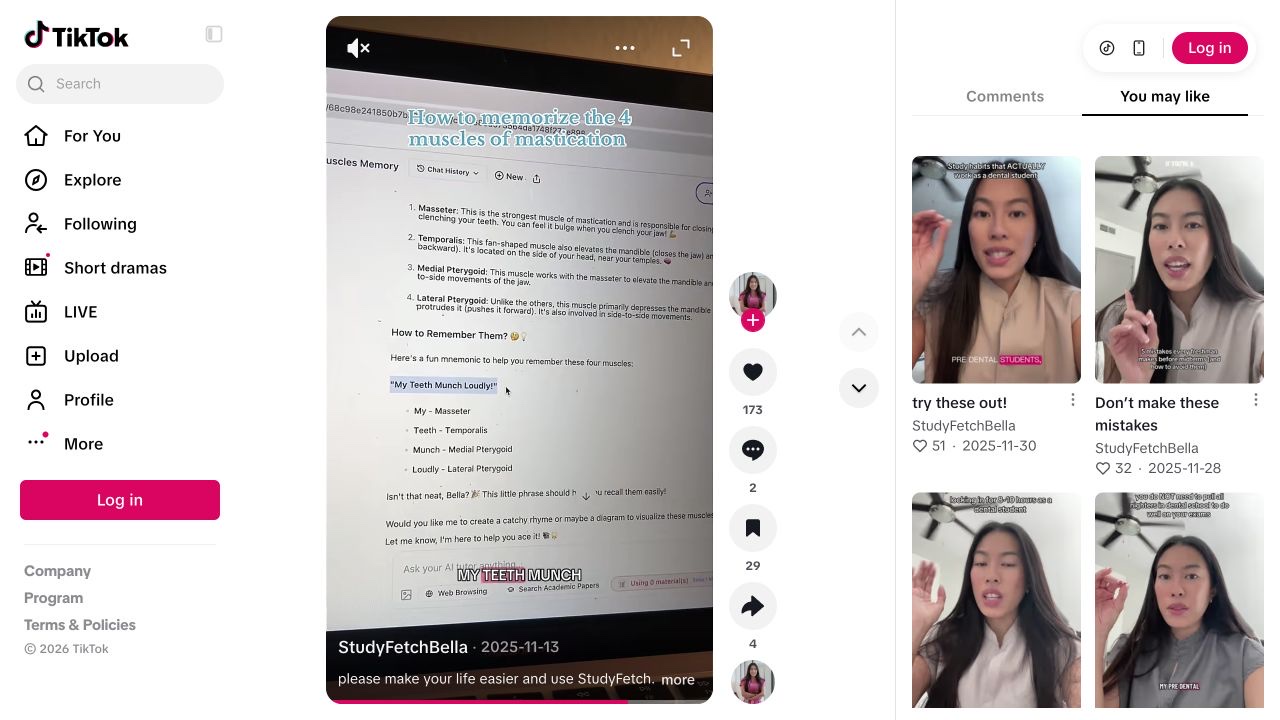
The view changes to a filmed laptop with StudyFetch’s chat and a prompt about the same memorisation task.
Our read. The continuity matters: the product addresses the exact problem introduced earlier. A cut to an unrelated dashboard would supply branding while withholding the useful connection.
- 03
Expose the output
The answer contains a mnemonic with words mapped to the terms; the clip then returns to the creator.
Our read. The viewer can inspect what the tool produced. The output’s presence is observable; its accuracy and usefulness still require subject-matter checking. That distinction should survive any adaptation.
One audience problem. One visible product action.
Original brief for a study app demonstration. A proposal to test.
“I keep mixing up these four terms, so I tried this.”
- Show on screen
- Use a study question you can verify. Show the problem, enter the request in the actual app and display the answer long enough to read. Correct any mistake on screen instead of hiding it in the edit.
- Keep the mechanism
- The same problem across the opening, prompt and answer.
- Make it yours
- Use your own subject, recording and explanation. Do not impersonate this creator or imply their endorsement.
- What to record
- Record the source clip, concept, account, post URL and publication date. Read product questions separately from generic reactions; use your own click and signup evidence for conversion claims.
Source & observation notes
The creator introduces a concrete memorisation task, then films the StudyFetch chat on a laptop. A prompt and its generated mnemonic are visible before the clip returns to the creator.
A narrow audience problem leads directly to the product operation that addresses it. The filmed screen gives the recommendation an inspectable object.
The creator’s commercial relationship with StudyFetch was not verified. This visual inspection does not validate the educational answer or establish organic reach, paid amplification or conversions.
Playback started and visual sequence inspected on 9 September 2026. Muted observation; no audio transcription or product test. Source checked 2026-09-09. Source 1 ↗ Source 2 ↗
01STORY BRIEFWhy the problem gives the screen meaning3 SCREENS

The first beat sets the task
A visible interface is not automatically understandable. The opening tells the viewer what to look for when the product appears.
An app demo is not just a recording of software in motion. It is an argument about why that software matters in a specific moment. That makes the opening sequence more than a stylistic choice. When two versions showcase the same feature and promise the same payoff, the first beat changes what the viewer must do mentally. A problem-first opening says, in effect, “Here is the situation.” A screen-first opening says, “Figure out the situation from this interface.” Those tasks are different. In AGD terms, that difference creates a creative hypothesis worth testing, not a universal platform law. My working recommendation is that, for discovery-oriented app content aimed at strangers rather than existing users, opening on the problem is usually the clearer default.
The central advantage is not drama but interpretation. If the audience hears the problem before seeing the product, the later product shot inherits an obvious role: this is the tool intended to resolve that problem. Without that setup, many app videos become detached tours through buttons, animations, and generated output. The viewer can tell that something happened on the screen while still failing to grasp what the tool is actually for. In a short-feed environment, that confusion is expensive. The archived StudyFetch example is useful here for a narrow reason already noted in our corpus: the memorization task is made legible, then the filmed app action appears, then the result is shown. As an archival social case, it does not demonstrate causation, superiority, or repeatable lift. What it does show is how a named problem can turn an interface shot from generic motion into a functional answer.
The measurement side matters just as much as the creative side. TokPortal’s analytics documentation is relevant because it spells out which analysis surfaces exist, how access differs by plan, and where teams should be cautious in interpretation [1]. The documented Analytics v2 system covers dashboard totals, account drilldowns, post records, stored trend series, comment retrieval surfaces, exports, and stored provider payload access for eligible accounts [1]. That matters because it lets a team convert a taste argument into an explicit comparison plan. You can review normalized post metrics, examine previously stored series data, export scoped video datasets, and in some tiers inspect cached comments tied to tracked posts [1]. Just as importantly, the documentation says the series route serves saved chart points rather than a constantly updating live view [1]. So the practical lesson is methodological: decide the comparison window in advance and judge posts at the same maturity stage instead of reacting to whatever appears first in an early chart.
A second measurement caution comes from the way comment data is documented. TokPortal does not present comments as an always-complete, uniform stream across every account and plan. The docs describe plan-gated access, cached comment behavior, and cases where the applied scope may differ from what a caller expected, especially when forcing samples on comment endpoints [1]. For a creative test, that means comment interpretation should be explicit and humble. If you are using comments to estimate whether viewers understood the use case, you should define eligibility rules before posting, record how comments were sampled, and note when data was unavailable rather than quietly treating missing observations as zero. This is less glamorous than arguing about hooks, but it is the difference between an editorial experiment and a retrospective story you tell yourself afterward.
The broader platform context also supports testing for comprehension rather than assuming it. TikTok’s newsroom article frames the platform as a place where discovery, consideration, and action can occur in one environment, and cites survey-based and commissioned research suggesting many users treat it as a place to research products before buying [2]. That is company messaging, not neutral proof that one opening order beats another. Still, it gives a reasonable strategic backdrop. If people may encounter an app post while still figuring out what a product does or whether it is relevant, then the opening seconds should reduce ambiguity rather than increase it [2]. The unresolved question is whether your specific interface already communicates the use case by itself. Sometimes a product screen is unusually self-explanatory. Often it is not. That uncertainty is exactly why a controlled creative comparison is useful.
Here is the practical AGD procedure. First, define one user problem narrowly enough that an uninformed viewer could restate it in a sentence. Second, script two variants whose bodies remain aligned after the first beat: same feature, same output claim, similar runtime, same caption intention, similar proof shot, and similar posting logic. Third, set a winner rule before publication. My preferred primary outcome is use-case clarity rate: the proportion of eligible comments that correctly describe the intended problem or job-to-be-done. Secondary measures can include confused-comment rate, comments per 1,000 views, shares per 1,000 views, and any tracked post metrics you consider relevant. Fourth, wait until both posts have reached the same maturity window. Fifth, collect the documented metrics and any accessible comments through your available workflow, keeping access limits and caching behavior in mind [1]. Sixth, choose the winner using the prewritten rule rather than whichever edit felt more stylish after the fact.
Consider a hypothetical planning example. Audience: first-year biology students trying to memorize four easily confused taxonomy terms. Feature: an app tool that converts a prompt into a mnemonic. Version A begins with the problem: “I keep mixing up these four terms,” then cuts to the app, shows the exact prompt, displays the mnemonic, and ends with the user placing it into notes. Version B starts on the screen with a general value statement about making memory aids quickly, then shows the same prompt, the same mnemonic, and the same notes shot. The device, framing, lighting, duration, and caption intent are held as close as practical. These details are illustrative only; they are not extracted performance data. If the problem-first version later produces a larger share of comments that correctly state the memorization use case, while the screen-first version attracts more uncertainty about what the tool is for, the team has learned something operational about sequencing. It has not discovered a law of nature.
This recommendation is intentionally narrow. It does not say problem-first always gets more views, comments, or sales. It does not say comments are a perfect proxy for comprehension. It does not say every TokPortal workspace will expose identical fields or comment access, because the documentation repeatedly ties visibility to plan level, endpoint, and data availability [1]. It does not say a newsroom article should be treated as a creative playbook, because it remains corporate framing [2]. And it does not say the StudyFetch example constitutes a controlled test. The claim is more modest and more useful: when an app’s value depends on a recognizable task, opening with that task is often the stronger default because it assigns meaning to the interface, creates a cleaner comparison against a screen-led version, and aligns with the documented measurement surfaces you can actually inspect afterward [1].
A workable AGD protocol for testing problem-first versus screen-first app demos
Start by separating documented infrastructure from editorial judgment. None of the supplied sources says TikTok requires creators to name a problem before showing an interface. None of TokPortal’s analytics docs claims one sequencing choice is inherently better. The recommendation here is therefore analytical, not official. The documented foundation is that TokPortal provides multiple ways to inspect account and post performance, including account-level drilldowns, tracked post records, stored trend points, export routes, and certain comment surfaces depending on access level [1]. That is sufficient to support a disciplined comparison if you decide in advance what question the test is meant to answer.
Opening-order test flow
- 011. Define one job
State the audience problem in one sentence that a stranger could repeat.
- 022. Build two variants
Change the opening beat while keeping the body, feature, and payoff aligned.
- 033. Wait for equal maturity
Review stored analytics and accessible comments only after comparable observation windows.
- 044. Score clarity
Decide which version made the intended use case easier for viewers to understand.
Illustrative AGD workflow for comparing a problem-led opening with a screen-led opening. The values are geometric placeholders, not measured outcomes.
A lightweight test sheet is enough. Include an experiment ID, account ID, audience definition, featured use case, opening text for each variant, elements held constant, observation window, primary metric, comment-eligibility rule, and winner rule. Then define the formulas before any post goes live. Use-case clarity rate can be calculated as clear comments divided by eligible comments. Confusion rate can be confused comments divided by eligible comments. Comments per 1,000 views and shares per 1,000 views are straightforward rate normalizations. If your plan allows it, TokPortal’s export and post-level analytics routes can help capture those observations into a reproducible log [1]. Reproducibility matters because opening-order debates often become memory contests after the fact.
There is also a procedural nuance in the documentation that is easy to overlook but important for fair testing. TokPortal’s comment endpoints and report-style outputs often echo what scope or settings were actually applied, and the docs warn users not to assume that every requested filter or brand setting was honored without checking the returned metadata [1]. Even though that warning appears in different contexts, the operational lesson generalizes: read back what the system says it used. In a creative experiment, the same attitude should govern your analysis. Do not assume your intended comparison survived execution unchanged. Confirm the exact account, date range, post identifiers, maturity window, and available fields before drawing conclusions.
A hypothetical example makes the protocol concrete. Suppose an exam-prep app offers a mnemonic generator. Variant A opens with a student problem sentence about confusing several terms, then shows the prompt entered on a laptop, then reveals the mnemonic, then ends with a note-taking proof shot. Variant B begins with the laptop interface and a generic utility statement, then shows the same prompt, same mnemonic, and same proof shot. Assume, purely for planning, that the analyst will code the first 30 eligible on-topic comments per post if available and will call Variant A the winner only if clarity improves without a worse confusion rate. None of those numbers comes from a source; they simply show how to predefine a rule you can later obey.
Why keep the StudyFetch case as the visual lens? Because the archived example fits the exact creative decision under discussion. As already summarized in our corpus, the content connects a specific memorization need to a visible product action and then to a resulting answer. That makes it a helpful reference for structure. It does not prove platform-wide performance effects, and it should not be treated as a replicable benchmark. Its value is narrower: it lets us point to an observable sequence in which the interface is easier to understand because the user problem is already on the table. For editors and operators making app discovery content, that is the useful lesson.
“If the interface is the answer, the audience usually needs the question first.”
02FIELD KITHow to test opening order without fooling yourself3 SCREENS
Keep the rest aligned
Match the feature shown, output, runtime, proof shot, and caption intent as closely as possible. Change the opening order, not the whole concept.
Put it to work.
- 01Write one plain-language sentence for the audience problem, one for the feature shown, and one for the promised output before production begins.
- 02Draft two versions in which only the first beat changes: one names the problem first, the other opens on the interface first.
- 03Before posting, record your primary metric, comment-eligibility rule, observation window, and decision rule.
- 04Compare posts only after they reach the same maturity window when reading TokPortal post metrics or stored series data [1].
- 05If comment access is missing, partial, or redacted, log that limitation directly instead of treating absent data as a zero value [1].
Notes & sources.
The limit. The trap is mistaking visual polish for conceptual clarity. A beautiful interface shot can still leave a new viewer unsure which problem the product solves.
- developers.tokportal.com/analytics/ · consulted September 8, 2026
- newsroom.tiktok.com/watch-it-love-it-want-it-how-tiktok-is-blending-discovery-connection-and-commerce · consulted September 8, 2026
THE ORGANIC CLUB is an editorial project initiated by TokPortal. That relationship is separate from the evidence behind claims. Editorial signatures and image credits are explained in our policy. Our editorial policy →