TokPortal MCP exposes social operations to an agent. A preview uses top-level dry_run: true, with creation parameters inside body; the decision to execute live remains a separate step.
01STORY BRIEFThe idea in three screens.3 SCREENS

Autonomy starts with knowing what still needs a green light.
A real MCP workflow starts with a readable preview, not a surprise charge.
An agent executing everything quickly is not necessarily a good operator. In a paid workflow, its first useful skill is explaining what it will trigger: country, platform, account and immediate or recurring costs.
The remote server is https://app.tokportal.com/api/ext/mcp. The local package documentation requires version 1.15.1 or later for reliable previews: version 1.15.0 advertised an argument it did not forward correctly. That detail matters more than an impressive agent demo.
Read available countries, prices and balance first. To preview a US TikTok account, tokportal_create_bundle accepts dry_run: true and a body containing bundle_type: account_only, platform: tiktok and country: USA. The response should distinguish simulated credits from charged credits.
Preview identifiers are synthetic. Never reuse them in production. After approval, create real resources and continue with their live identifiers. YouTube bundle creation is not supported through this API in the documentation consulted.
Make the preview a contract a person can inspect.
A dry run earns its name when the reviewer can explain what will happen next without reading the agent’s optimistic narration. For a publishing job, that means the intended account, asset version, caption, time window, cost scope and the action that would cross into real execution. A preview that returns a plausible success message but hides these choices has only moved uncertainty into a nicer interface. Give the reviewer a concrete difference between the current state and the proposed state.
A reviewable execution boundary
- 01Propose
Show the exact account, asset and intended action.
- 02Inspect
Review scope, current capabilities and costs.
- 03Execute
Use live inputs only after the specific plan is accepted.
Editorial model: a way to reason about the process, not measured platform results.
For TokPortal, keep the distinction between a simulated response and a live resource explicit. A synthetic identifier returned by a preview is not something to reuse as if it had been created in production. Before executing a reviewed plan, check current tool documentation and required inputs again, especially when the preview was produced earlier or by another agent. Store the approval against the actual plan revision. If the caption, account or price-sensitive scope changes, the old approval should not silently travel with it. Autonomy becomes useful when the boundary is specific enough to audit.
Treat the preview as a small production meeting with a written agenda. The operator should be able to identify the account or bundle being requested, the country, the quantity, the expected cost and the fact that the operation is still simulated. If the response contains simulated identifiers, keep them out of later live calls. Store the preview beside the proposed inputs, then make any change visible before execution. A dry-run result that nobody reads is only an extra request in the log.
The example payload below is intentionally narrow. It demonstrates the shape of a documented preview request, not a complete autonomous acquisition system. A real workflow must still check current tool capabilities, authorisation, cost and the final live result. If the service returns an uncertain state, reconcile it before retrying. Keep an explicit distinction between prepared, approved, executed and verified. Those states make it possible to give an assistant useful autonomy without treating every fluent completion message as proof that the underlying operation succeeded. The objective is a concrete action a person can understand before it has consequences.
From the idea to the actual workflow.
Product screens, documented tools and a practical way to connect them.
Connect an AI assistant to the actual TokPortal tools
The remote MCP address is the entry point for an assistant. The screenshot shows TokPortal’s real connection screen, including the authorisation step. Your API key does not belong in an editorial prompt.
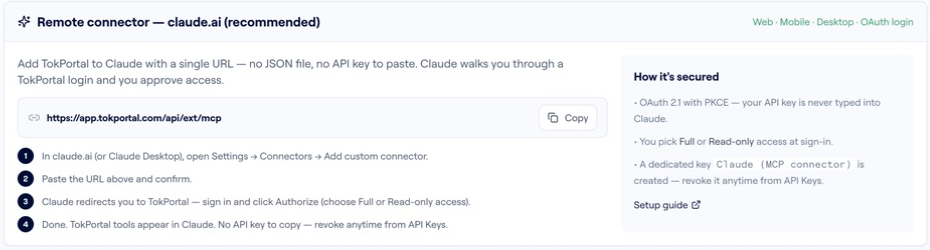
https://app.tokportal.com/api/ext/mcpInspect my existing TikTok accounts and the current credit rules.
Prepare three distinct creative angles for a US audience.
For each, identify the account, required media and a valid publishing window.
Preview any proposed creation with dry_run: true.
Report credits_would_charge, recurring Coverage and missing inputs.
Do not create or publish a live task.Copy this as a planning brief after connecting your assistant. It asks for a concrete preview, not a pretend transcript of successful execution. Remote MCP supports the documented dry-run workflow; local tokportal-mcp needs version 1.15.1 or later.
- 01Read-only first
Choose read-only access when the job is inventory or analysis. Publishing requires an appropriately authorised connection.
- 02Discover current tools
Use the tool catalogue available in the connected workspace instead of assuming a capability from a marketing page.
- 03Review before execution
Check destination, assets, price and review windows against the actual tool response.
Preview an account with three video slots before committing credits
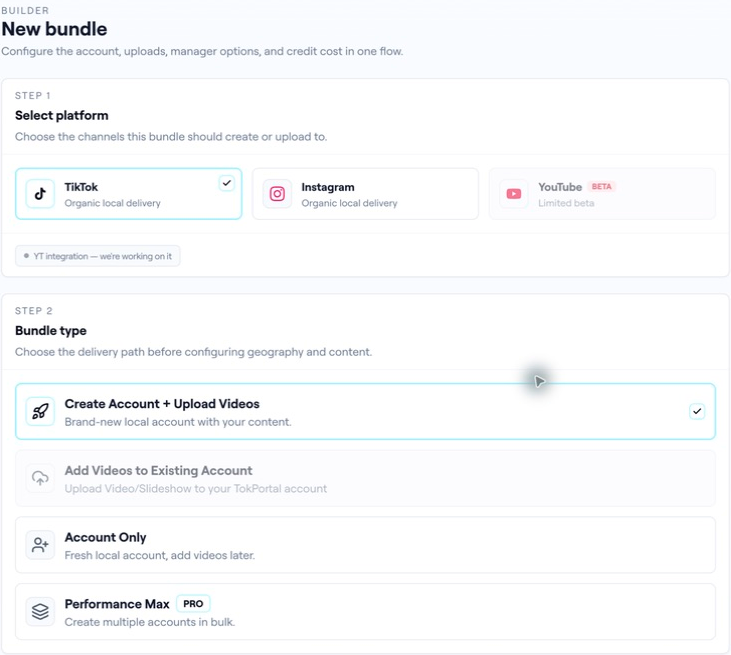
The archived builder shows account and video-package choices. This sample MCP request previews a package with one account and three video slots; it does not upload three video files.
POST /api/ext/bundles{
"tool": "tokportal_create_bundle",
"arguments": {
"dry_run": true,
"body": {
"bundle_type": "account_and_videos",
"platform": "tiktok",
"country": "USA",
"videos_quantity": 3,
"edits_quantity": 0,
"wants_advanced_warming": false,
"auto_finalize_videos": false
}
}
}This is a sample request, not an executed order or a price quote. In REST, the equivalent simulation uses X-TokPortal-Dry-Run: true. Live creation debits credits immediately; the preview is the place to inspect the actual workspace-specific price.
- 01Read the quote
Read the quoted credit fields and cost_breakdown returned by the current contract. A simulation does not debit the live balance.
- 02Keep simulation separate
Returned simulation IDs are synthetic and cannot be reused in live requests. The simulation does not retain cross-call objects.
- 03Review the package
auto_finalize_videos is explicitly false here. Check the current review-window rules before any live execution.
“Autonomy starts with knowing what still needs a green light.”
02FIELD KITFrom concept to practice.3 SCREENS
Read countries, prices and balance before previewing.
Adapt this to your audience, budget and test scope.
Put it to work.
- 01Read countries, prices and balance before previewing.
- 02Check credits_charged: 0 in the simulated response.
- 03Wait for explicit approval before live creation.
Notes & sources.
The limit. A dry run validates a contract; it does not reserve real accounts or capacity.
- developers.tokportal.com/mcp/ · consulted September 8, 2026
- developers.tokportal.com/sandbox/ · consulted September 8, 2026
THE ORGANIC CLUB is an editorial project initiated by TokPortal. That relationship is separate from the evidence behind claims. Editorial signatures and image credits are explained in our policy. Our editorial policy →