For TikTok search-intent app demos, a practical default is problem → result glimpse → minimum steps → inspectable return.
StudyFetch: make the study problem the opening
The StudyFetch archival case is the better fit because it is already an app-demo example. Its visible sequence supports a narrow structural lesson: a specific study problem leads into a corresponding product prompt and then a visible answer. Readers should also see its limitations and archival date clearly: checked 2026-09-09, muted visual inspection, no claim about endorsement, accuracy, distribution, or conversion.
- FORMAT
- Specific problem → filmed app → usable answer
- PRODUCT’S ROLE
- StudyFetch is shown answering the task introduced by the creator.
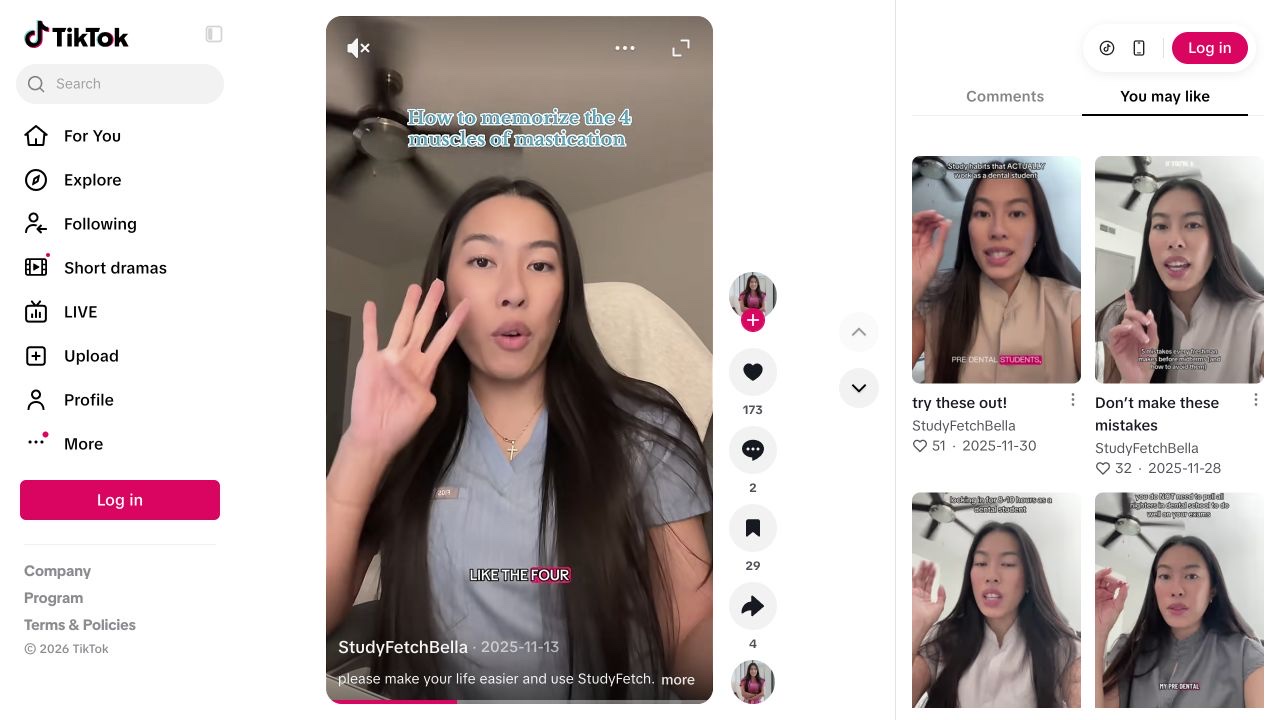
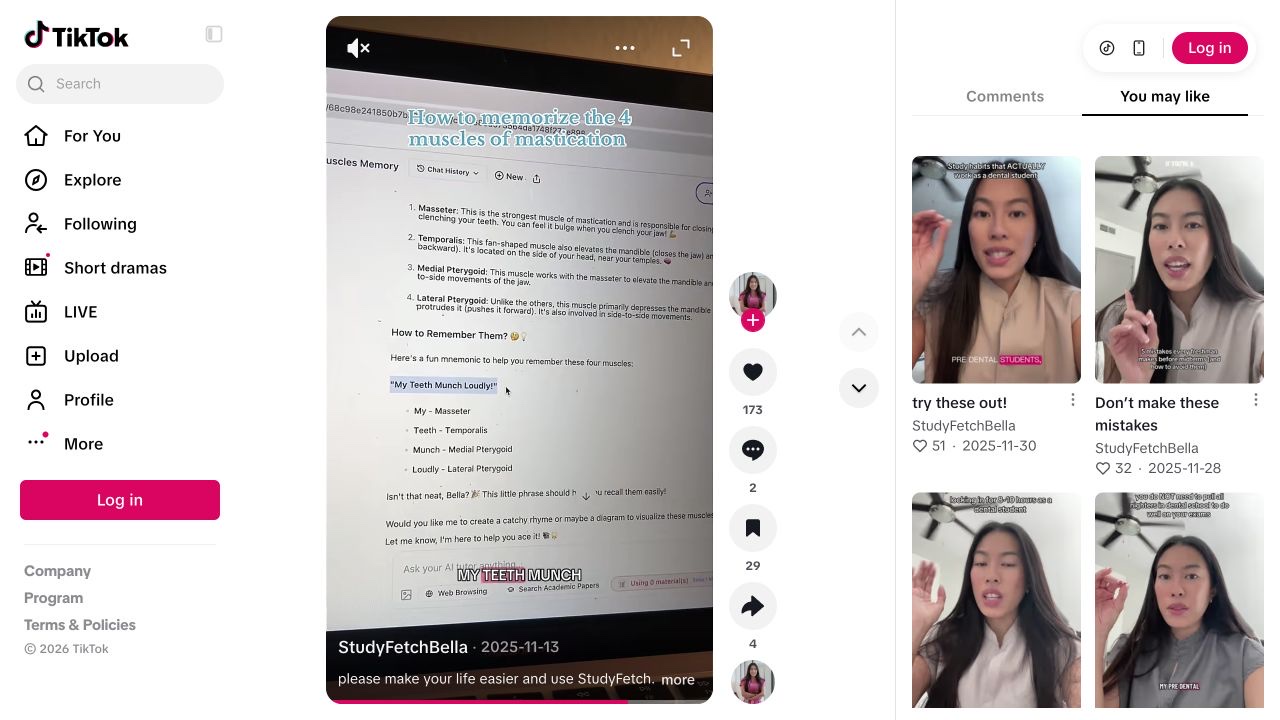
A student trying to remember a defined set of terms.
- 01
Name the job before the app
The creator speaks to camera about memorising four terms and counts them on her fingers.
Our read. The opening lets a relevant viewer recognise their own problem. It gives the later app appearance a reason to be in the video, beyond a generic claim that AI saves time.
- 02
Show the request
The view changes to a filmed laptop with StudyFetch’s chat and a prompt about the same memorisation task.
Our read. The continuity matters: the product addresses the exact problem introduced earlier. A cut to an unrelated dashboard would supply branding while withholding the useful connection.
- 03
Expose the output
The answer contains a mnemonic with words mapped to the terms; the clip then returns to the creator.
Our read. The viewer can inspect what the tool produced. The output’s presence is observable; its accuracy and usefulness still require subject-matter checking. That distinction should survive any adaptation.
One audience problem. One visible product action.
Original brief for a study app demonstration. A proposal to test.
“I keep mixing up these four terms, so I tried this.”
- Show on screen
- Use a study question you can verify. Show the problem, enter the request in the actual app and display the answer long enough to read. Correct any mistake on screen instead of hiding it in the edit.
- Keep the mechanism
- The same problem across the opening, prompt and answer.
- Make it yours
- Use your own subject, recording and explanation. Do not impersonate this creator or imply their endorsement.
- What to record
- Record the source clip, concept, account, post URL and publication date. Read product questions separately from generic reactions; use your own click and signup evidence for conversion claims.
Source & observation notes
The creator introduces a concrete memorisation task, then films the StudyFetch chat on a laptop. A prompt and its generated mnemonic are visible before the clip returns to the creator.
A narrow audience problem leads directly to the product operation that addresses it. The filmed screen gives the recommendation an inspectable object.
The creator’s commercial relationship with StudyFetch was not verified. This visual inspection does not validate the educational answer or establish organic reach, paid amplification or conversions.
Playback started and visual sequence inspected on 9 September 2026. Muted observation; no audio transcription or product test. Source checked 2026-09-09. Source 1 ↗ Source 2 ↗
01STORY BRIEFDefine the proof before the walkthrough3 SCREENS
Wrong level of brief
“Show the AI study feature” describes a product area, not the thing a viewer will judge on screen.
This article addresses a narrower editing decision than our separate piece on whether an app demo should begin with the problem or with the product screen. Here, assume the opening problem is already on screen. The next question is what to do immediately after that: cut into the workflow, or briefly show the finished output first. For search-intent demos, I think the stronger default is usually a short result glimpse. That framing is intentionally distinct from the opening-hook question: the earlier article is about the first orientation move; this one is about the proof move that follows it.
TikTok’s documentation provides context, not a creative rulebook. TikTok says Search helps people explore and learn, and says Creator Search Insights can surface often-searched and content-gap topics in select regions [1]. From that, the cautious inference is that query-fit matters. It does not follow that one edit sequence is officially preferred, or that a result glimpse will outperform every other structure. My claim is editorial and conditional: when someone arrives with a narrow practical query, a fast look at the solved state can help them decide sooner whether the video matches the job they came to solve.
The recurring app-demo failure is not “too little product.” It is procedure without destination. Teams say “show the feature,” then the video becomes taps, menus, and cursor movement before the audience knows what those actions are building toward. A result glimpse changes the meaning of the steps that follow. The viewer is no longer waiting to discover the point of the demo; they are watching how a visible output was produced. That difference matters most when the searcher is trying to answer a concrete question such as: Will this make a usable quiz card, a clean summary, a categorized expense sheet, or a caption draft I can actually inspect?
That is why I use the term proof object. A proof object is the specific finished artifact the viewer can judge on screen. It is not the feature category and not the marketing promise. “Study faster” is a claim. “A mnemonic list for four biology terms plus one quiz card” is a proof object. “Organize spending” is a claim. “A sheet with recurring subscriptions grouped by merchant and one flagged duplicate charge” is a proof object. Once the brief names the proof object, the editor can decide three concrete things: what counts as a recognisable result glimpse, which steps are truly necessary, and how long the video must return to the output for inspection.
A directly relevant archival case is the StudyFetch example, not because it proves performance, but because it is already an app-demo pattern. The archived case section should visibly show readers the post URL, references, and checked date: checked 2026-09-09, based on muted visual inspection, with limitations preserved. What is supportable from that archive is modest and useful: the creator introduces a specific memorisation task, the video shows a filmed laptop with the corresponding prompt, and a mnemonic answer is visible before the clip returns to the creator. That makes it a closer analogue for this article than a food-prep video. It shows problem continuity, visible product action, and a readable output without requiring us to infer unsupported steps or outcomes from a distant category.
Below is a completed worked artifact for production use. Proposed data: Search job = “how to memorize biology terms fast.” Proposed data: Audience problem line = “I keep mixing up these four cell-respiration terms.” Proposed data: Proof object = “a review set titled Cell Respiration Review containing four mnemonic lines and one visible quiz card.” Human decision: Result glimpse should show the review-set title plus at least one mnemonic line in a single stable shot. Human decision: Inspectable return should hold long enough for a reviewer to read the title and two complete output lines without pausing. Filled decision rows: Row 1, opening problem: yes, speak or caption the exact study problem in plain language by second 1.5. Row 2, result glimpse: yes, show the completed review set between seconds 1.5 and 3.0; success means the artifact is recognisable as the solved state, not merely a decorative flash of interface chrome. Row 3, minimum steps: show only the note input and the mode selection needed to causally explain the output; omit account setup, idle loading, and unrelated menu tours. Row 4, inspectable return: hold on the generated set for roughly 2 to 3 seconds; success means an internal reviewer can verify title, topic match, and at least two readable lines. Row 5, usage moment: show one quiz card or recall check using the generated material; success means the output is used to complete the job, not just displayed as a claim.
The execution criteria need to stay concrete because “show the result” is otherwise too loose to review. Result glimpse standard: the shot must answer “what got made?” within about one second, using legible output rather than a generic dashboard view. A glimpse does not need full readability, but it must identify the class of artifact: summary, mnemonic set, itinerary, checklist, or similar. Inspectable return standard: the later hold must let a reviewer confirm that the output materially matches the opening problem. For the study example, that means the terms shown belong to the stated biology task and the mnemonic content is readable enough for a human reviewer to judge whether it is at least plausibly on-topic. APIs do not assess that creative adequacy. That judgment remains editorial and human.
TokPortal is relevant only after the creative is chosen. Its documented delivered-account MP4 preview workflow can validate one exact slot-configuration request against the API’s configuration rules for the current request and current account state, without publishing, replacing the slot, or buying new capacity [2]. That means a team can separately check whether a specific bundle ID, slot position, caption, direct MP4 URL, and future publish date are structurally valid now [2]. It does not tell you whether the result glimpse is clear, whether the inspectable return is long enough, whether the proof object is convincing, or whether later media or platform checks will accept the file for publication [2]. Keep the layers separate: human editors assess creative quality; the dry run assesses request validity under the current contract.
A final boundary matters. TikTok’s For You documentation notes that recommendations depend on multiple factors, and that content not suitable for a broad audience may also be harder to find in search [3]. So even a very clear search-intent structure is not a guarantee of findability, distribution, or downstream product outcomes. The practical value of this framework is narrower: it helps teams build demos that answer a searcher’s job more legibly, document the proof object in the brief, and review the finished cut against explicit human criteria instead of vague taste alone.
Differentiate the opening question from the proof question
Source summary [1]: TikTok says Search helps people explore and learn, and says Creator Search Insights can surface often-searched topics and content-gap topics in select regions. That supports the broad idea that creators should think about query alignment, but it does not prescribe a winning edit order.
Two adjacent but different app-demo questions
- 01Opening question
Problem first or screen first? This is about the first orientation move.
- 02Current article
After a problem-first opening, show steps immediately or show a result glimpse first?
- 03Proof object
Define the exact finished artifact the viewer can judge.
- 04Review standard
Check recognisable glimpse first, readable inspection later.
Editorial distinction to reduce overlap between related articles.
Source summary [2]: TokPortal’s delivered-account MP4 preview flow checks one requested video-slot configuration on a real delivered account without publishing, replacing the slot, or purchasing capacity. The documentation explicitly limits the preview to current request validation and current account state; it does not prove later media reachability, later platform acceptance, publication, or audience outcome.
Source summary [3]: TikTok says For You recommendations reflect multiple factors and notes that content unsuitable for a broad audience may also be harder to find in search. This is a distribution boundary, not a creative endorsement of any specific demo structure.
The useful editorial distinction is this: article A asks whether to begin with the problem or the screen; article B asks what comes immediately after a problem-first opening. That separation reduces search-intent overlap and gives each page a distinct job. This page is about the proof object and its review criteria, not about the first-frame hook alone.
A good production rule is to separate proposed data from human judgment. Proposed data can include the query target, the proof object, the planned timestamps, and the slot request fields for a later dry run. Human decisions include whether the result glimpse is recognisable, whether the inspectable return is readable, whether the output actually addresses the opening problem, and whether the creative should ship at all. No API in the supplied material assesses those creative questions.
From the idea to the actual workflow.
Product screens, documented tools and a practical way to connect them.
Prepare the actual video slot, not just the caption
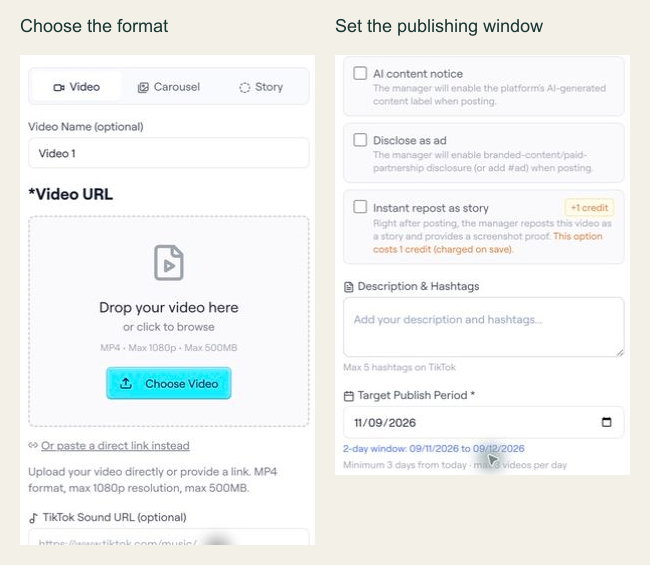
In the archived editor capture, the interface shows Video, Carousel and Story options, plus a target publishing period. The API example below is a separate documented slot-configuration preview; the screenshot alone does not establish the API contract.
PUT /api/ext/bundles/{id}/videos/{position}{
"tool": "tokportal_configure_bundle_video",
"arguments": {
"id": "<real-bundle-uuid>",
"position": 1,
"body": {
"video_type": "video",
"video_url": "<public_url returned by your video upload>",
"description": "A practical example of organising freelance subscriptions.",
"target_publish_date": "<valid future date: YYYY-MM-DD>",
"ai_content_disclaimer": false,
"auto_publish": false
},
"dry_run": true
}
}Replace the marked values with an authorized real bundle, a media URL you control and a valid future date. This is a dry-run template, not an executed campaign. The archived UI shows a two-day period for that captured example; use the current API validation response to determine the dates accepted for your own request.
- 01Choose the correct media fields
A video needs video_url and description. A TikTok carousel instead needs carousel_images and tiktok_sound_url.
- 02Use a valid window
Allow at least three days while account creation is pending, or one day for delivered/existing accounts. Check the current response and limits.
- 03Read the preview result
Check the simulation markers and date validation. If INVALID_DATE includes details.earliest_allowed, use that returned limit to revise the proposed date. Never copy preview IDs into live requests.
“After the problem is named, the viewer usually needs proof before procedure.”
02FIELD KITMake the sequence reviewable3 SCREENS
Result glimpse
A reviewer should recognize the solved state quickly, even if every word is not yet readable.
Put it to work.
- 01Add two required fields to every app-demo brief: “Proof object” and “Result glimpse pass condition.”
- 02Use this review checklist before approval. Human decision 1: Can a relevant viewer tell by second 3 what finished artifact the demo claims to produce? Human decision 2: During the later inspectable return, can a reviewer read enough output to judge whether it matches the opening problem?
- 03When comparing edits, hold the opening problem constant and test only the post-problem sequence: Version A goes straight to steps; Version B adds a brief result glimpse before the same steps.
- 04If using a delivered-account workflow, dry-run the final slot request separately to validate the current request and account state before any live action [2].
Notes & sources.
The limit. Do not confuse configuration validity with persuasive proof. A dry run can confirm that one slot request is structurally valid now [2]; it cannot tell you whether the creative shows a meaningful result glimpse or an inspectable return.
- newsroom.tiktok.com/creator-search-insights · consulted September 8, 2026
- developers.tokportal.com/use-cases/no-code/mp4-delivered-account-preview/ · consulted September 8, 2026
- support.tiktok.com/en/getting-started/for-you/test-for-you · consulted September 8, 2026
THE ORGANIC CLUB is an editorial project initiated by TokPortal. That relationship is separate from the evidence behind claims. Editorial signatures and image credits are explained in our policy. Our editorial policy →